[IMPORTANT UPDATE] MultiPoolX is no longer operating. But there is a recent surge in bitcoin, you may want to check out the technology. Learn why mining crypto-currencies are no longer profitable.
It looks like this is run by Michael X (Michael Taggart) and Mark Lyford.
This is akin to distributed computing, like calculating protein folding by sending bits of tasks to lots of computers around the world.
In return for you computing power, you are rewarded, or "mine", one lot of the currency.
MultiPoolX is a service that does this mining for you, so you don't have to deal with getting hardware, setting stuff up, etc.
They take a 30% margin, and pays out daily with Bitcoin.
(There are other options mentioned in the webinar.)
They also issue a credit card that you can use to withdraw by spending directly from your account.
I'm starting out with the $1300 SHA 1Th plan.
The maximum risk is $1300, if this is a scam, or cryptocurrencies get outlawed, cease to exist, etc.
Even if that happens, my normal life is not affected, other than maybe I will feel very depressed. :)
(Now is a good time to read the disclaimer again.)
My plan is to cash out my Bitcoins once the initial investment of $1300 is reached.
This will make the remaining profits risk-free.
I will reinvest the next $1300 to another SHA contract, and the next $1650 to a SCRYPT contract.
After that, I will continue reinvesting SHA, then SCRYPT, and so on, and set them up as 50/50 Bitcoin/mined currency.
The exit strategy will be when a contract is unable to produce the reinvesting amount in one year.
I will stop reinvesting, and cash (or Bitcoin) out.
Here's how to start.
First, pay the $500 deposit to secure the contract.

The page doesn't work in Chrome, so I switched to Firefox.

Sign the contract with HelloSign.

Enter e-mail.

Wait for the verification e-mail.

Review document.

Read the contract.

Click to sign.

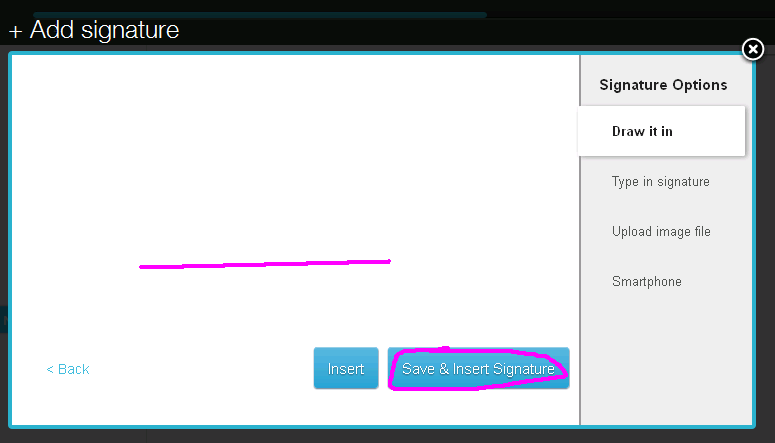
You can just use your mouse to draw it in.
Technology is pretty cool. :)

Save and Insert Signature, and agree to the contract.
Done!

Continue to complete your order.

Pick a plan.
As stated above, I am going with the SHA-256 1 Th for $1,300.

The balance needs to be wired, or you can contact support to pay by Bitcoin.

Once wired, enter the confirmation form.

And I'm all set.

Once confirmed, they will send you login information.
As this point in time, I haven't received mine yet.
I'm not sure if 48 business hours means 2 business days or 6 business days of 8 hours each.
I'll send support an e-mail, and keep updating this post as work progresses.
[Update 1/21/15]
As it turns out, they have not yet received confirmation on my wire.
In a separate e-mail, they announced that they ran out of hashing power with their current servers, and are obtaining new hardware to handle the increase in demand.

They are offering Banx Shares to compensate for the time.
[Update 2/14/15]
They confirmed my wire, and I have started mining on 2/3/15.
BanxPool is the facade to the mining servers.
Log in using the information they have sent you.

FYI, they didn't send me my PIN, so the first thing I did was reset my password and PIN.

The upper-left box shows your current activity.

In the Accounts tab, I see that I have mined 0.02383682 BTC as of 2/9.

The details are broken down per currency in the statistics page.

To receive the mined currencies, they recommend using Cryptsy.

Enter your Cryptsy Trade Key, Multipool PIN, and save.

I set my Cryptsy Integration Level to "Full Auto".
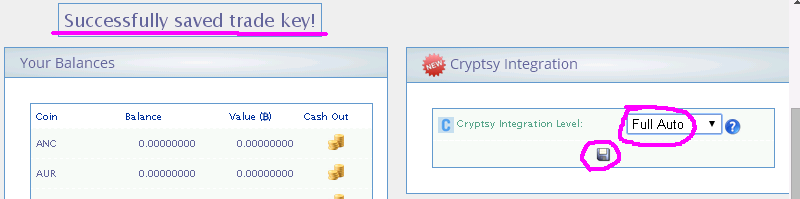
But I couldn't get the import to work online.
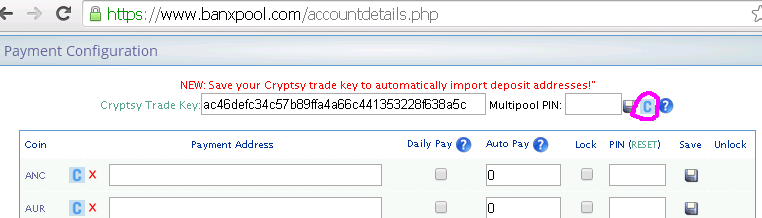
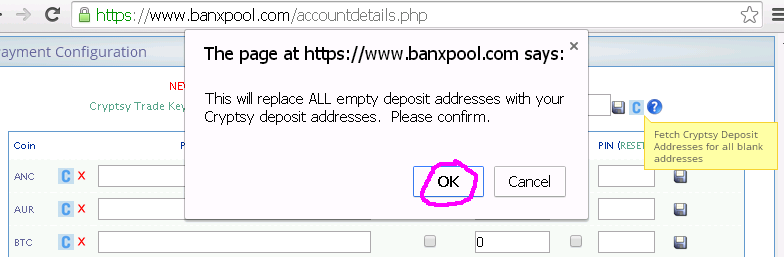
I think a batch runs overnight, and all the keys were set next morning. :)

The "Balances" section shows how much of the mined currencies are in your server.

To get a daily payout, check "Daily Pay" and Save.
You have to do this for each currency.

I'm going to send the Bitcoins to my Coinbase account.

Anything transferred will be shown in the "Recent Withdrawals" section.

You will also get e-mails when the transfer is confirmed.